
What's new in Mermaid Studio 2026.4.1?
Last updated:
Mermaid Studio 2026.4.1 bundles Mermaid.js 11.17.2 as the default runtime and supports its two headline syntax additions in the editor: collapsible flowchart subgraphs and subgraphs in ER diagrams. TreeView gains editing keys and a formatter, and Kanban gains metadata and mention completion.
Also in this release, the style presets in the Element Style pane are recalibrated so every family reads as one palette with the theme it derives from. The HCT color picker adds a color wheel for picking hue and chroma together.
In Remote Development on a 2026.2.2 or later host, the diagram editor now runs in the JetBrains Client instead of on the backend.
Highlights
Section titled “Highlights”Mermaid.js 11.17.2
Section titled “Mermaid.js 11.17.2”Mermaid.js 11.17.2 is now the default Mermaid.js runtime and 11.12.3 has been removed.
The editor recognizes both new syntaxes, and frontmatter completion and validation cover the configuration keys added in 11.17.
Collapsible flowchart subgraphs
Section titled “Collapsible flowchart subgraphs”On Mermaid.js 11.17, a flowchart subgraph can render as a single node using the generalized shape syntax with the view: collapsed attribute.
flowchart LR  subgraph auth [Authentication]      Login --> Tokens[Issue tokens]  end  Tokens --> Home[Home page]
  auth@{ view: collapsed }
Mermaid Studio detects when a generalized shape declaration refers to a subgraph and offers completion for the view attribute and its values.
In the preview’s edit mode, click the ellipsis row of a collapsed subgraph to expand it, or select one or more subgraphs and press
Collapsed subgraphs are still valid drop targets in the interactive editor, so you can drop nodes onto one to make them its children.
Each toggle is written to the source as the view statement after the subgraph’s end, so the collapsed state renders the same anywhere.
New flowchart shapes
Section titled “New flowchart shapes”The five node shapes added in Mermaid.js 11.17, such as folder and person, are in the shape picker and completion, and validation accepts them.
ER diagram subgraphs
Section titled “ER diagram subgraphs”ER diagrams can now group entities in subgraph id [Title] … end blocks.
A subgraph id works as a relationship endpoint and as a class or style target.
erDiagram subgraph Sales ["Sales domain"] CUSTOMER ||--o{ ORDER : places end subgraph Catalog PRODUCT ||--o{ LINE_ITEM : "priced as" end ORDER ||--|{ LINE_ITEM : contains Sales }o--o{ Catalog : "sells from"The editor support for entities applies to subgraphs too, from completion and folding to rename refactoring and Find Usages.
Pressing end.
The structure view groups entities under their subgraphs, and clicking a cluster in the preview jumps to its declaration.
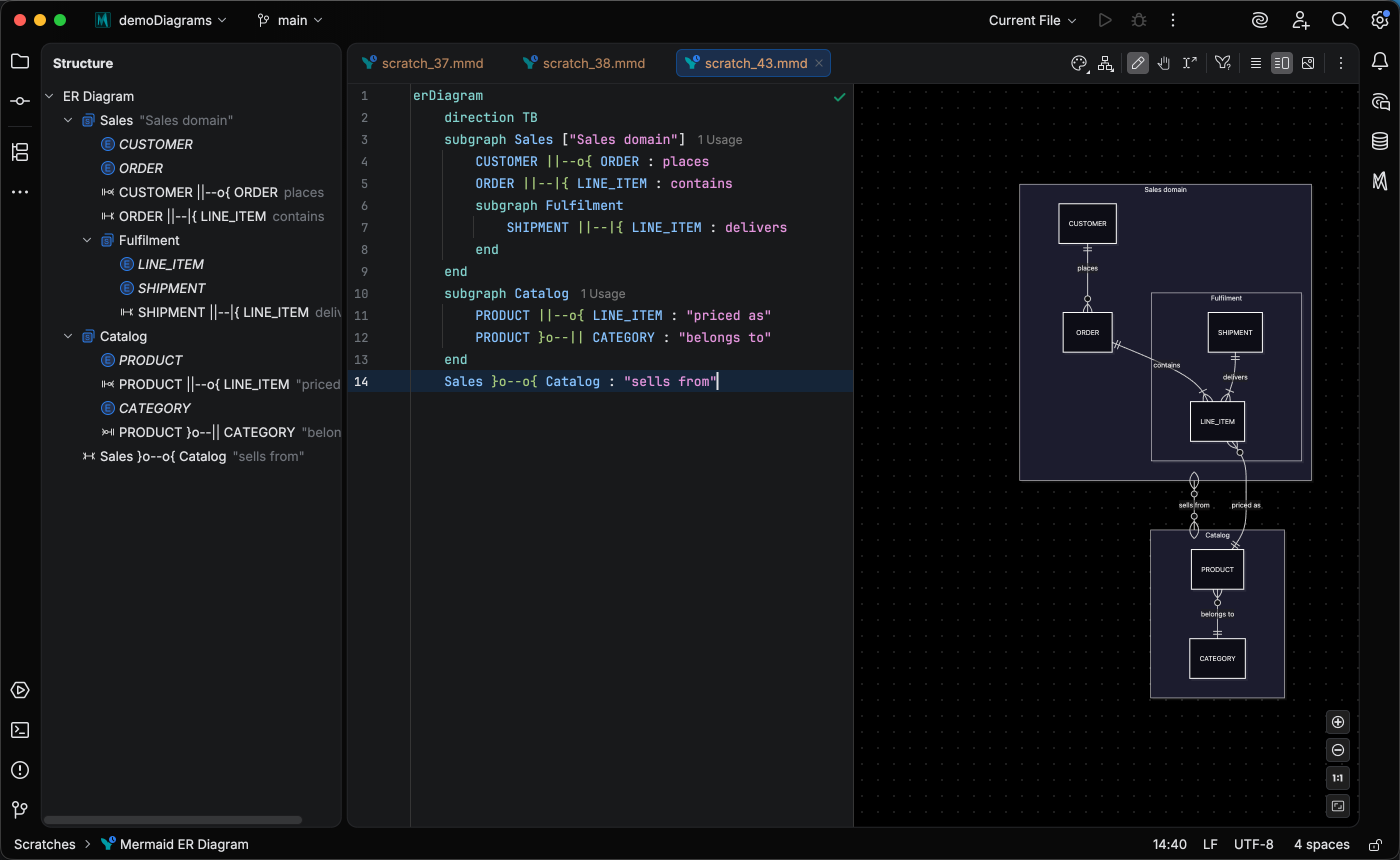
Large ER diagrams also highlight faster, since the plugin analyzes the file once per edit and reuses the result instead of rescanning it for every lookup. The ER diagram page covers the syntax and the editor support.
TreeView editing and formatting
Section titled “TreeView editing and formatting”The TreeView diagram type’s editing experience has been updated to include support for authoring directory trees using box-drawing characters or whitespace depending on your preference.
Pressing
In a box-drawing tree, ├──, └──, and │ guides with every move.
Reformat Code re-indents every row by its depth, repairs stale connectors, and converts a tree between whitespace indentation and box-drawing characters. Pick the target notation on the new Settings > Editor > Code Style > Mermaid > TreeView page. The three box-drawing keys can be switched off under Settings > Editor > General > Smart Keys > Mermaid Studio if you prefer the platform’s own Tab handling. See TreeView editing.
Kanban completion
Section titled “Kanban completion”Inside a card’s @{ ... } block, completion offers the assigned, ticket, and priority keys and, after each key, values drawn from the board itself: the assignees already named, the next ticket number in the format your tickets use, and the five priority levels.
priority: Medium, which Mermaid.js accepts, is no longer flagged.
Type @ at the start of a word inside a card’s description to pick an assignee or another card’s ticket number; the chosen value replaces the @ as plain text.
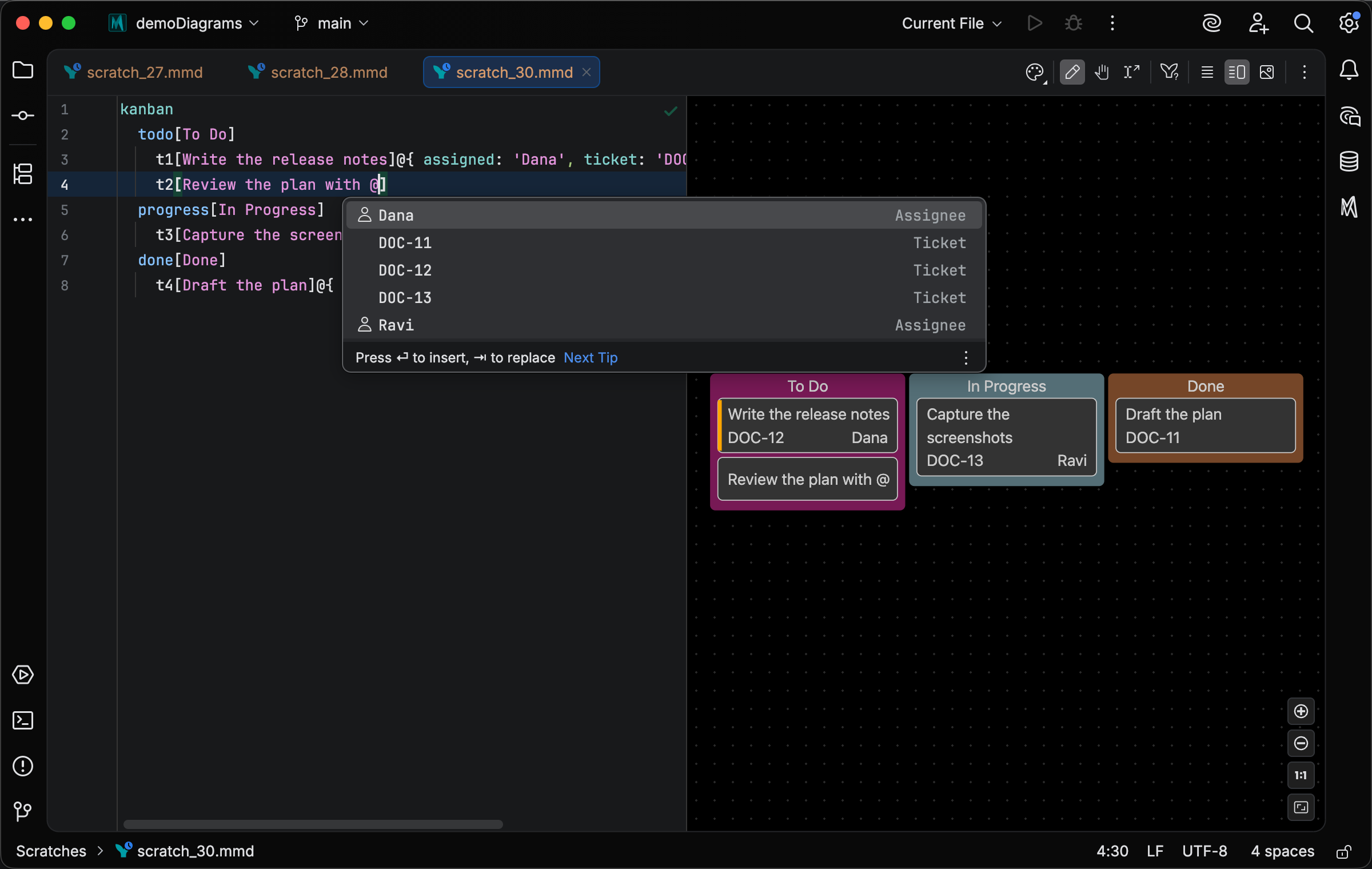
Renaming an assignee or ticket to a value YAML would read as a number, boolean, or comment (such as 007 or #12) quotes it, so the card renders the text as written.
Remote development on the JetBrains Client
Section titled “Remote development on the JetBrains Client”On a Remote Development host running 2026.2.2 or later, the diagram editor now runs in the JetBrains Client instead of being streamed from the host. This eliminates the awkward second toolbar and delayed rendering startup experienced when the editor was streamed from the backend.
On older hosts, the preview is still streamed from the host. See Remote Development.
Sample picker search improvements
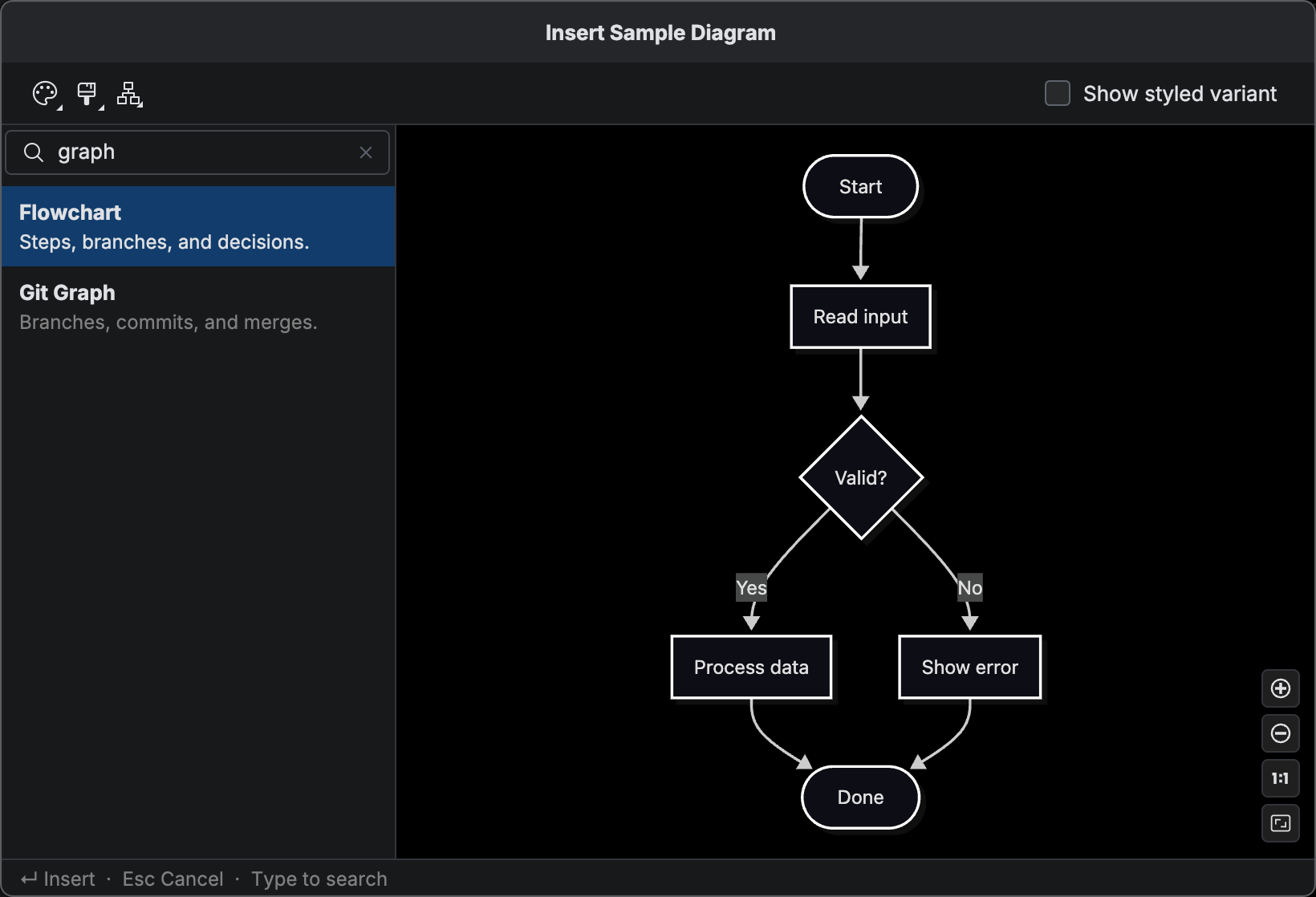
Section titled “Sample picker search improvements”Start typing in the sample picker and a search field appears above its list.
It matches sample names, descriptions, and diagram-type keywords, so graph or sequenceDiagram selects the right sample, and
Style presets and the color wheel
Section titled “Style presets and the color wheel”The Element Style pane’s theme-derived presets are recalibrated and now offer nine hue families.
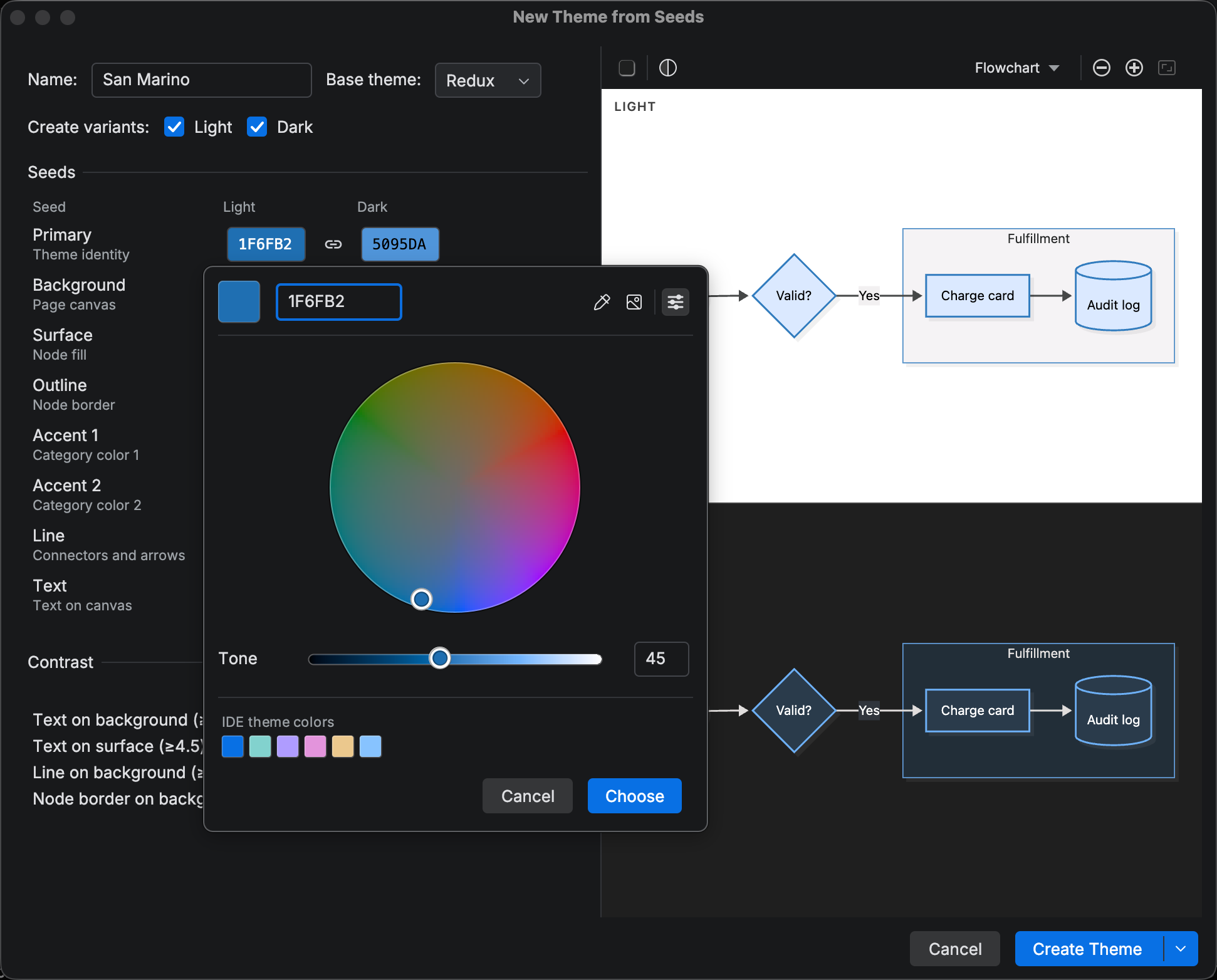
The HCT color picker has a new Color Wheel mode, switched from its header toolbar.
When the color wheel is active, a hue and chroma disc drawn at the current tone replaces the two sliders, with the tone slider below it.
Use the arrow keys to move around the disc,
Changelog
Section titled “Changelog”- Mermaid.js 11.17.2 bundled as the default runtime version
- Flowchart:
folder(aliasdirectory),bucket,console,browser, andpersonshapes (Mermaid.js 11.17) in completion, validation, and the shape picker; an older pinned runtime gets a version error on the shape value - Flowchart: collapsible subgraphs (Mermaid.js 11.17).
id@{ view: collapsed }after a subgraph’sendcompletes, resolves to its subgraph, and is updated by rename, delete, and ungroup; a warning with a move fix catches a statement placed beforeend - Preview edit mode: clicking a collapsed subgraph’s ellipsis row expands it, and with subgraphs selected
-collapses and+(or=) expands them as one undo step; a title-only subgraph gets an id derived from its title first - ER diagram: subgraph support (Mermaid.js 11.17) with nesting and
direction, subgraph ids as relationship endpoints andclass/styletargets, folding, structure view, formatting, completion, rename, Find Usages, asublive template, Enter after an unclosed header, and preview navigation from a cluster - ER diagram: inspections for an entity that shares a subgraph’s identifier and for a subgraph nested inside itself, each with a rename fix
- ER diagram: the structure view shows entities and groups where Mermaid.js renders them
- ER diagram: one cached model of the file backs resolution, completion, navigation, and inspections, so they agree and large files highlight faster
- Kanban: completion for task metadata keys and values
- Kanban:
@mentions in a task description offer the board’s assignees and ticket numbers, and the chosen value replaces the@ - Color picker: an optional Color Wheel mode
- TreeView: Enter continues the tree with the right indent or box connector, one level deeper after a directory; in a box-drawing tree Tab, Shift+Tab, and Backspace move a row between levels and redraw the connectors
- TreeView: the box-drawing Tab, Shift+Tab, and Backspace keys can be switched off under Settings > Editor > General > Smart Keys > Mermaid Studio
- TreeView: Reformat Code re-indents rows by depth, redraws box-drawing connectors, and converts between indentation and box-drawing (Settings > Editor > Code Style > Mermaid > TreeView)
- Custom themes: theme variables that were missing per diagram type in generated themes and the theme editor
- Frontmatter: keys added in Mermaid.js 11.17 complete and validate
- MCP: the
generateMermaidDiagramandgenerateMermaidPngoutput path can be relative to the project root, the form to prefer when the project is in WSL or a dev container
Changed
Section titled “Changed”- Style pane: theme-derived presets are recalibrated for contrast and offer nine named hue families
- Remote development: on a 2026.2.2 or later host, the diagram editor and its preview run in the JetBrains Client instead of being streamed from the host
- Sample picker: search from a field above the list, matching diagram-type keywords, and clearing on Esc without closing the picker
- Sample picker: styled samples share one theme-derived palette that reads on light and dark canvases and no longer pin a theme
- Sample picker: Sankey, Swimlane, and the ABNF, EBNF, and PEG railroad samples have a Styled variant
- Sample picker: the Theme, Look, and Layout toolbar applies to styled variants too
- The diagram type is named TreeView consistently across the plugin
- Mindmap: indentation on Enter and on reformat inside code fences
- Enter in overwrite mode no longer inserts a block body or closing punctuation
- Several
mermaidcode fence formatting issues that arise in the 2026.3 EAP - Highlighting and completion in Mermaid code fences continue to work while the IDE is indexing
- Inside a Markdown fence, the line named by a duplicate declaration warning is now the line in the Markdown file rather than a count from the start of the fence
- Mindmap: Reformat Code on a node with a trailing
::icon(...)or:::classsuffix no longer shifts every node’s indentation - A diagram’s frontmatter inside a Markdown fence nested in a list item: on 2026.2, Tab indented the list item and the fence instead of indenting inside the frontmatter
- Remote development: closing the configuration overrides editor from the JetBrains Client no longer reports a read-access error on 2026.2 hosts
- Remote development on a host older than 2026.2.2: Tab inside a standalone
.mmdfile’s frontmatter inserted the diagram’s indent instead of YAML’s two spaces - Preview edit mode: an edit started on a render the document has since moved past is refused instead of applied to stale ids
- Flowchart and swimlane edit mode: deleting a node, edge, or subgraph preserves a partner node’s shape, label, and class declarations
- Class diagram preview: navigation and editing work when the runtime reports the diagram as
classDiagram(the default on Mermaid.js 11.17) - Icon sets settings: previewing an icon set no longer freezes the IDE while the collection is parsed
- Export, print, and copy: Cancel on the progress indicator stops the render immediately instead of waiting out the timeout
- The IDE’s embedded browser process dying mid-session produces one notification instead of an error on every later attempt
- Flowchart: the Remove property quick fix on a
@{ … }block no longer leaves a stray comma behind - Preview: subgraph selection and navigation with non-ASCII, hyphenated, or quoted ids
- ER diagram:
directioncompletion works again and offers whole statements such asdirection TB - ER diagram: several parsing inconsistencies resolved, including inline
%%comments, empty or whitespace-only quoted names, and reserved words inside unquoted aliases - Class diagram: the rename quick fix on a duplicate or conflicting member renames in place instead of opening the rename dialog
- Architecture: backslash and bracket handling in titles
- ER diagram: an entity attribute block no longer reports the IDE error
createNode method should be implementedon 2026.1 and later - Kanban:
priority: Mediumis no longer flagged as invalid, and the task live template offers it - Kanban: renaming an assignee or ticket to a value YAML would read as a number, boolean, null, or comment now quotes it
- Appearance menu: on Wayland, applying a theme no longer moves focus to the Light/Dark toggle
- Color picker: the resolved-color swatch no longer stretches across the header when the picker has no pipette or Add image button
- Element style pane: presets intermittently not being available
- Style pane: dragging a color slider no longer logs an IDE error on each live update
- Opening any editor no longer parses the file to decide whether it is a Mermaid diagram
Removed
Section titled “Removed”- Mermaid.js 11.12.3 bundle